DOTS Score Calculator
Calculate your DOTS coefficient score — the modern bodyweight-equalised metric for powerlifting.
No supportive suits. Belt, wraps or sleeves allowed.
Your competition or training bodyweight.
Combined best squat + bench press + deadlift.
This DOTS Score Calculator computes your bodyweight-equalized powerlifting score, maps it to an 8-tier competitive level system for raw and equipped lifting, and, in Individual Lifts mode, identifies which of your three competition lifts is most limiting your total. Everything you need to benchmark your powerlifting performance across weight classes in under 30 seconds.
What the DOTS Score Calculator Does
| Feature | What it does |
| 🎯 DOTS Score | Primary bodyweight-equalised score computed to 2 decimal places |
| 🏅 Competitive Level Badge | 8-tier classification from Getting Started to Elite, shown instantly on your score |
| 📊 Formula Comparison | DOTS, Wilks (1998), and Wilks 2020 scores side-by-side with relative progress bars |
| 📋 Competitive Level Guide | Full 8-level table with DOTS ranges, filterable by Raw or Equipped, current level highlighted |
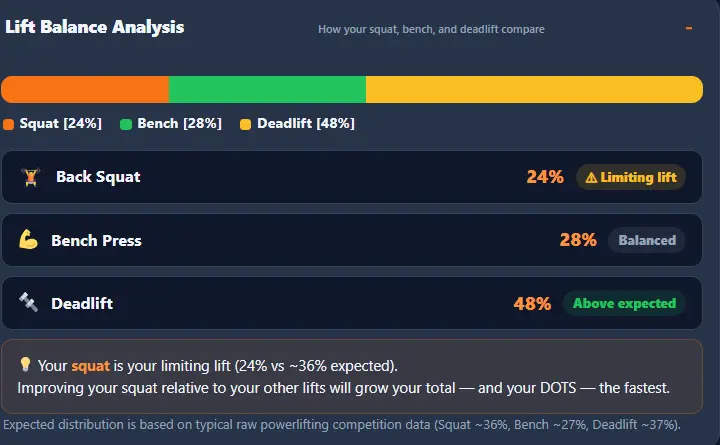
| ⚖️ Lift Balance Analysis | Individual Lifts mode only: shows squat/bench/deadlift distribution vs expected ratios, flags limiting lift |
| 📖 About DOTS | Built-in explanation of the DOTS formula, history, and federations that use it |
| ♂♀ Sex-Specific Coefficients | Separate 4th-degree polynomial coefficients for male and female lifters |
| 🏷️ Raw / Equipped Categories | Separate competitive level tables for raw and equipped lifting |
| 🔄 Live Total Pill | In Individual Lifts mode, running sum updates as you type |
| ⬇️ PDF Export | Full results report as a PDF, generated entirely in the browser, no upload |
| Clean print view formatted for paper | |
| 📱 Mobile-Friendly | Fully responsive two-column layout collapses to single column on narrow screens |
| ♿ Accessible | Keyboard navigable, ARIA-labelled, screen-reader announcements |
Two features set this calculator apart from a standard Wilks tool: the 8-tier competitive classification gives you a more precise competitive benchmark than the typical 5-6-tier system, and the Lift Balance Analysis tells you exactly which lift to target for the fastest DOTS score improvement.
How to Use the DOTS Score Calculator?
Step 1: Select Sex and Competition Category
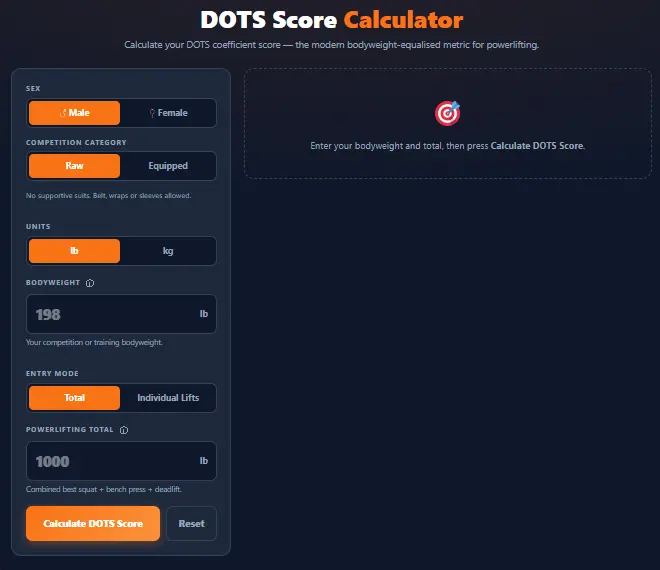
Select Male or Female; the DOTS polynomial uses entirely different coefficient sets for each sex. Then select Raw or Equipped. This category does not change the DOTS calculation itself (the formula is identical for both) but it determines which competitive level threshold table is used when classifying your score. If you compete raw (belt and wraps/sleeves only), select Raw. If you compete with a squat suit and bench shirt, select Equipped. If you're unsure, select Raw; it applies to most recreational lifters.
Step 2: Choose Units and Enter Bodyweight
Choose lb or kg; all inputs, placeholders, and results switch instantly. Enter your competition or training bodyweight. DOTS is validated for Male: 40-210 kg and Female: 26.51-150.95 kg. A warning appears if you are within 5% of the boundary, but results are still shown. The maximum accepted bodyweight is 400 kg. The DOTS formula always computes internally in kilograms regardless of your displayed unit.
Step 3: Select Entry Mode and Enter Your Total
Total Mode
Switch the toggle to Total and enter your combined best squat, bench press, and deadlift as a single number. Use a competition total or the sum of your current training PRs. This is the fastest entry method and is the right choice when you already know your total and don't need the lift balance analysis.
Individual Lifts Mode
Switch to Individual Lifts and enter your squat, bench press, and deadlift separately. All three are required; partial entry is rejected. The calculator sums the three automatically and shows a live running total pill as you type. This mode activates the Lift Balance Analysis accordion in the results, the calculator's most distinctive feature, covered in full in its own section below. When you switch back to Total mode, the sum auto-populates the total field.
Step 4: Press Calculate and Read Your Results
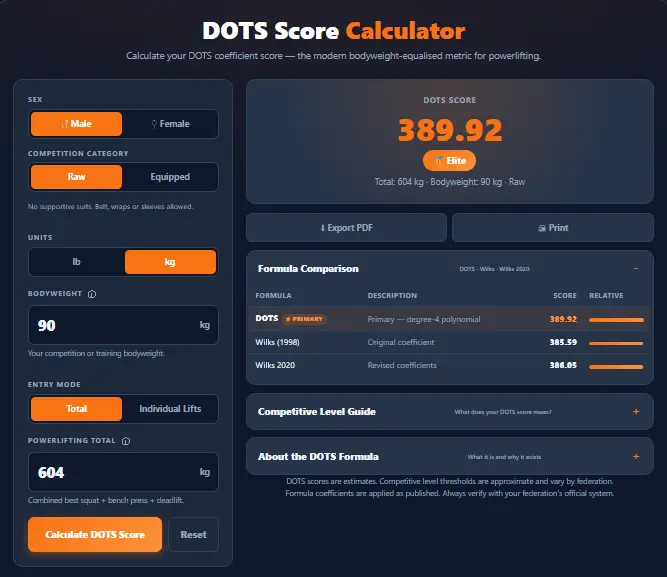
After pressing Calculate DOTS Score, or pressing Enter in any field, four things appear: the primary result card showing your DOTS score and 8-tier competitive level badge; the Formula Comparison accordion (open by default) showing DOTS, Wilks 1998, and Wilks 2020 side by side; the Competitive Level Guide accordion (closed by default) showing the full 8-tier table with your current level highlighted; and, in Individual Lifts mode, the Lift Balance Analysis accordion. The sections below cover each in depth.
What is a DOTS score?
What DOTS Stands for and Why It Was Created
DOTS stands for Degrees Of Theoretical Stress. It is a bodyweight-equalized scoring coefficient for powerlifting, designed to allow fair comparison of squat, bench press, and deadlift totals across different bodyweight classes. Without a coefficient system, heavier lifters hold a natural advantage in absolute load: a 120 kg lifter totalling 700 kg and an 80 kg lifter totalling 550 kg cannot be compared on raw numbers alone. The DOTS score adjusts each total by a coefficient derived from a 4th-degree polynomial fitted to competitive lifting data, producing a single unitless number comparable across bodyweights and sexes.
The Problem with Earlier Scoring Systems
The original Wilks formula (1998) dominated powerlifting scoring for decades but developed known weaknesses. Its 5th-degree polynomial was calibrated on 1990s competition data and produced inconsistently favorable scores for lifters at the lightest and heaviest ends of the bodyweight spectrum. As the sport grew and data accumulated, these discrepancies became more apparent. DOTS was developed with a simpler 4th-degree polynomial to produce more numerically stable and equitable scores across the full competitive bodyweight range, particularly at the extremes. The International Powerlifting Federation chose to develop its own GL Points system separately in 2019, so DOTS and IPF GL are distinct systems.
How DOTS Differs from Per-Lift Strength Standards
This is an important distinction for anyone arriving from the Strength Standards Calculator. That calculator rates each of five lifts independently against the general strength training population. DOTS is a competitive powerlifting metric: it evaluates the combined squat, bench press, and deadlift total only, specifically for athletes comparing performance across bodyweight classes in a competition context. Use the Strength Standards Calculator for general training benchmarking; use DOTS for competitive powerlifting comparison. The Strength Standards & Benchmarks guide covers the population-level picture in full.
The DOTS Formula Explained
The 4th-Degree Polynomial Structure
Formula notation:
DOTS Score = Total (kg) × 500 ÷ (a + b·BW + c·BW² + d·BW³ + e·BW⁴)
In plain English: the formula divides your total by a polynomial function of your bodyweight, then multiplies by 500 to produce the familiar score range. The polynomial denominator increases with bodyweight, so heavier lifters divide by a larger number, requiring a proportionally larger total to achieve the same DOTS score as a lighter lifter.
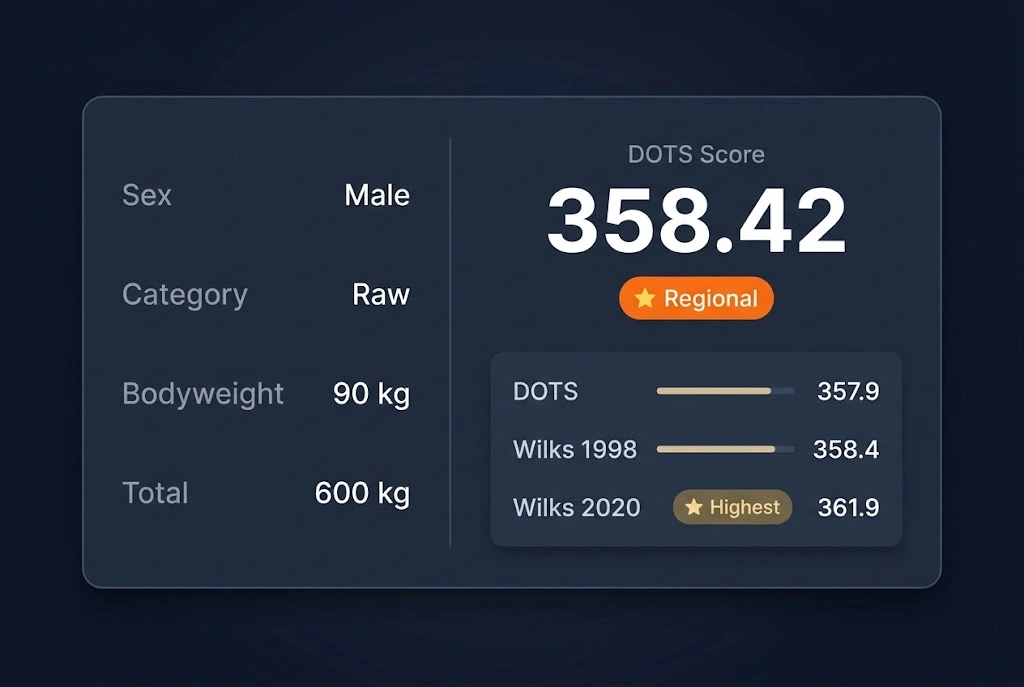
Worked example: a 90 kg male with a 600 kg total:
- The denominator evaluates to approximately 838.38 (using male coefficients at 90 kg)
- DOTS = 600 × 500 ÷ 838.38 ≈ 357.86
DOTS Polynomial Constants
These are the exact values used in the calculator engine. BW = bodyweight in kilograms.
| Constant | Male | Female |
| a | −307.75076 | −57.96288 |
| b | 24.0900756 | 13.6175032 |
| c | −0.1918759221 | −0.1126655495 |
| d | 0.0007391293 | 0.0005158568 |
| e | −1.0740558 × 10⁻⁶ | −1.0706 × 10⁻⁶ |
Scores are rounded to 2 decimal places after computation.
Why 4th-Degree vs. Wilks's 5th-Degree Polynomial
A 4th-degree polynomial has one fewer term than Wilks's 5th-degree, making it simpler and less susceptible to overfitting at the extremes of the fitted range. Wilks's 5th-degree polynomial can produce unusual curve behavior at very low and very high bodyweights because a higher-degree polynomial has more flexibility to fit the training data but can oscillate between data points. The 4th-degree DOTS polynomial trades some fitting precision for more consistent and predictable behavior across the full competitive bodyweight range. Both are imperfect; DOTS represents a deliberate design choice to prioritize stability over complexity.
Your DOTS Score and Competitive Level: The 8-Tier System
The 8-tier competitive level system provides more granular resolution than the 6-tier Wilks system, with distinct thresholds separating Club Competitor from Regional and Regional from National Qualifier levels that matter for competition planning. Female thresholds are approximately 10-15 points lower per tier than male thresholds, reflecting calibration to competitive data for each sex.
Male Raw Competitive Levels
| Level | DOTS Range | What it represents |
| 🌱 Getting Started | 0-69 | Beginning the competitive journey; first meet territory |
| 💪 Recreational | 70-79 | Club-level training; consistent progress |
| 🔥 Club Competitor | 80-89 | Local and regional meets; established as a competitive lifter |
| ⭐ Regional | 90-99 | Top regional performer; qualifying for national events |
| 🏅 National Qualifier | 100-119 | Competitive nationally; strong performances in open meets |
| 🏆 National Level | 120-139 | Top national competitor; podiums in national events |
| 🌍 International | 140-159 | World-class standard; competitive internationally |
| 🥇 Elite | 160+ | Top of the sport; world record territory |
Female Raw Competitive Levels
| Level | DOTS Range | What it represents |
| 🌱 Getting Started | 0-59 | Beginning the competitive journey |
| 💪 Recreational | 60-69 | Club-level training; building competition experience |
| 🔥 Club Competitor | 70-79 | Local and regional competition |
| ⭐ Regional | 80-89 | Top regional performer |
| 🏅 National Qualifier | 90-99 | Competing nationally |
| 🏆 National Level | 100-119 | Top national competitor |
| 🌍 International | 120-139 | World-class standard |
| 🥇 Elite | 140+ | Top of the sport |
How to Use the Competitive Level Guide Accordion?
The Competitive Level Guide accordion is closed by default. Expanding it reveals the complete 8-tier table for your sex and category, with your current level highlighted in orange. A Raw/Equipped toggle inside the accordion lets you compare thresholds for both categories without recalculating, useful for understanding how much higher your score would need to be to reach the same competitive level in equipped lifting.
Using Your Level to Set Competition Goals
Your competitive level is a more specific goal-setting tool than your raw DOTS score. If you're at Regional (90-99 DOTS), your next concrete target is 100+ DOTS for National Qualifier status. To find the total you need, rearrange the DOTS formula: Total = Target DOTS × denominator ÷ 500, using your current bodyweight and the relevant polynomial constant set. This gives a specific kg total to program toward rather than an abstract score. For the full competitive context, see the Powerlifting & Competition guide.
DOTS vs. Wilks 1998 vs. Wilks 2020: The Formula Comparison
What the Side-by-Side Comparison Shows
The Formula Comparison accordion (open by default in your results) shows your total calculated against all three formulas simultaneously, with a relative progress bar for each. The formula with the highest score is tagged ★ Highest. DOTS is not always the highest of the three; depending on bodyweight, one of the Wilks formulas may produce a higher score. This is expected, not a flaw: different polynomials weight different bodyweight ranges differently, which is precisely why showing all three simultaneously is informative.
| Formula | Polynomial degree | Calibration data | Example score (90 kg male, 600 kg total) |
| DOTS | 4th-degree | ~2019 competition data | ≈ 357.9 |
| Wilks 1998 | 5th-degree | 1990s IPF data | ≈ 358.4 |
| Wilks 2020 | 5th-degree | Updated 2020 IPF dataset | ≈ 361.9 |
Scores vary across formulas because each polynomial assigns a different coefficient to the same bodyweight. At other bodyweights the ranking of the three scores changes.
When DOTS Is Higher vs. Lower Than Wilks
At lighter bodyweights, DOTS typically scores higher than Wilks 1998 because the 4th-degree polynomial assigns lighter athletes a lower coefficient than the 5th-degree Wilks polynomial, producing a higher quotient. At heavier bodyweights, the relationship may reverse. Neither score is "correct"; they represent different mathematical models of the same underlying relationship. The practical implication: when comparing to historical records or lifters scored under Wilks, use the formula those records were set under.
Which Formula Should You Use?
- DOTS: use when your federation uses DOTS, or when you want the modern 4th-degree polynomial calibrated for current competitive populations.
- Wilks 1998: use when comparing to historical records or lifters in federations still using the original Wilks.
- Wilks 2020: use when comparing to IPF-affiliated competition results from 2020 onward.
- All three: run all three to see which formula most favors your bodyweight; useful for understanding the spread and selecting the most meaningful comparison basis.
Note: The IPF uses its own GL Points system, separate from all three shown here. Check your federation's current official formula before a competition.
For a dedicated comparison, see the Wilks Score Calculator
Lift Balance Analysis: Identify Your Limiting Lift
How the Analysis Works
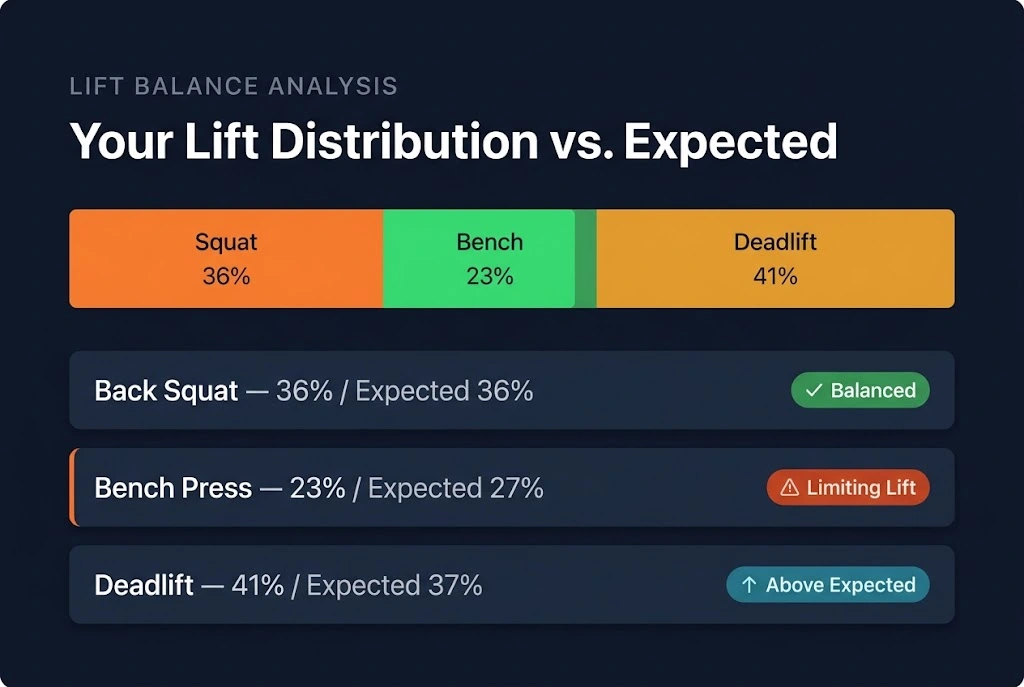
Available in Individual Lifts mode only. Once you enter squat, bench press, and deadlift separately and calculate, the Lift Balance Analysis accordion appears. It compares your three lifts against the expected distribution in competitive powerlifting:
- Back Squat: approximately 36% of total
- Bench Press: approximately 27% of total
- Deadlift: approximately 37% of total
For each lift, the calculator shows your lift's actual share as a percentage of your total, the expected share for that lift, and a status badge: Limiting Lift, Above Expected, or Balanced. A stacked bar chart at the top provides a visual proportional breakdown, with segments in orange for squat, green for bench, and yellow for deadlift.
Understanding the "Limiting Lift" Flag
The lift with the most negative deviation from its expected share is flagged as your limiting lift. This is the lift where targeted improvement will produce the largest gain in your total and, therefore, the largest gain in your DOTS score. For most intermediate lifters, the bench press is the most commonly flagged limiting lift because it carries the lowest expected share (27%) and is where strength typically lags furthest behind the squat and deadlift. If all three lifts are at or above their expected share, the analysis shows "Your lifts are well-balanced," meaning your total is limited by overall strength, not a specific lift imbalance.
How to Use the Analysis to Grow Your DOTS Score Fastest?
The practical application is direct. If your total is 600 kg (220 squat, 140 bench, 240 deadlift), your bench represents 23.3% of your total: 3.7% below its expected 27% share. That gap represents approximately 22 kg of underdevelopment in your bench relative to your squat and deadlift. Adding 22 kg to your bench (without changing the others) would bring your total to 622 kg and your DOTS score from roughly 358 to approximately 371, a 13-point improvement from targeted development of one lift. Use the limiting lift badge to focus training cycles productively.
Raw vs. Equipped DOTS Scoring
What the Category Toggle Changes
The Raw/Equipped toggle in the calculator inputs does not change the DOTS score calculation; the mathematical formula is identical for both. What changes in the competitive level table are used to classify your score? Equipped lifters achieve higher totals using supportive equipment (squat suit, knee wraps, bench shirt) that allows significantly greater loads. The equipped competitive level thresholds are approximately 20-30 DOTS points higher than raw thresholds to account for this equipment benefit. A raw DOTS score of 100 and an equipped DOTS score of 100 represent very different achievements.
Reading Equipped Thresholds in the Competitive Level Guide
The Competitive Level Guide accordion inside your results includes a Raw/Equipped toggle. Switching it to Equipped displays the higher threshold set without requiring you to recalculate. This is useful if you're transitioning from raw to equipped lifting and want to understand how much additional total your equipment will need to provide to maintain your current competitive tier.
DOTS in Competitive Powerlifting
Which Federations Use DOTS?
DOTS emerged around 2019 alongside the IPF's move to GL Points. Several national and international federations outside the IPF have adopted it as their primary scoring formula, particularly in Europe and among federations that rejected IPF GL in favour of a simpler, community-developed system. The specific federation list changes year to year. Always verify your federation's current official scoring formula before a competition; using DOTS to benchmark against results scored under GL Points or Wilks creates direct comparison issues.
DOTS vs IPF GL Points: The Other Modern System
The International Powerlifting Federation uses its own GL Points system, introduced in 2019 at the same time DOTS emerged. Both were developed as responses to the same perceived weaknesses in Wilks 1998. GL Points use a different mathematical approach calibrated specifically to IPF competition data and cannot be used interchangeably with DOTS. This calculator computes DOTS (Wilks 1998 and Wilks 2020); it does not compute IPF GL Points. If you compete in an IPF-affiliated federation, your official score at a meet will be in GL Points.
Export, Print, and Share Your Results
Export to PDF
Clicking Export PDF generates a PDF entirely in your browser; no server, no upload, and no data leaves your device. The file (saved as dots-score.pdf) includes your inputs (sex, category, bodyweight, total, units, entry mode), your DOTS score and competitive level, the formula comparison (DOTS, Wilks 1998, Wilks 2020), lift balance data when Individual Lifts mode was used, and a disclaimer note. Use for sharing with a coach, tracking competition prep progress, or keeping a training log.
Print Your Results
Clicking Print opens the browser's print dialog with a dedicated print stylesheet that strips the calculator UI and formats your results cleanly for paper. Works with "Save as PDF" in any browser as an alternative to Export PDF. The print view includes only your results, not the input form or accordions.
Technical Notes, Validation, and Limitations
Calculation Engine and Input Validation
All computation runs client-side in JavaScript; no data is sent to any server. The DOTS coefficient is computed with full floating-point precision; only the final score is rounded to 2 decimal places. The engine is deterministic: identical inputs always return identical results. For background on the 1RM inputs this calculator accepts, see One Rep Max Basics.
| Input | Rule | Detail |
| Sex | Required | Must be Male or Female |
| Category | Required | Must be Raw or Equipped |
| Bodyweight | Required, validated | Must be a finite positive number within the formula's validated range for your sex |
| Total (Total mode) | Required | Finite positive number; maximum 2,000 kg |
| Lifts (Individual mode) | All three required | Each must be finite positive, less than 1,000 kg; partial entry rejected |
| Bodyweight boundary | Warning (non-blocking) | If within 5% of formula boundary, results are shown but accuracy may be reduced |
DOTS Limitations and Disclaimers
A few things DOTS doesn't account for:
- DOTS scores are estimates; competitive level thresholds are approximate and vary by federation, year, and weight class
- The formula is calibrated for powerlifting totals (squat + bench + deadlift); don't apply it to Olympic weightlifting or other sport totals
- Age is not factored in; masters and juniors have separate competitive expectations not reflected in these levels
- Equipment variations beyond the raw/equipped distinction (single-ply vs multi-ply) are not captured
- Results may differ slightly from official federation calculators due to rounding or precision differences in coefficient application