
Training Max Calculator
5/3/1 training max, weekly weights & cycle projections
In a percentage-based program, every weight derives from a single number: your training max. This training max calculator converts your 1RM into that anchor, applies your chosen TM percentage, and generates set-by-set weights for every week of the cycle. For lifters on 5/3/1, the preset builds the full four-week table automatically. The one rep max calculator can estimate a 1RM from a training set if you need it first.
What the Training Max Calculator Does
| Feature | What it does |
| 🏋️ Training Max Calculation | Multiplies your 1RM by your chosen TM% to produce the training max |
| 📊 Quickview Mode | Summary card: TM value and top-set weights for each week at a glance |
| 📋 5/3/1 Preset Table | Full four-week table: Week 1 (5/5/5+), Week 2 (3/3/3+), Week 3 (5/3/1+), Deload |
| ⚙️ Custom Table | User-defined percentage range and step: generate any progression scheme from your TM |
| 🎚️ TM% Selector | Preset options at 85%, 87.5%, 90%, 92.5%, 95% plus a custom entry field |
| 📥 1RM Entry | Direct 1RM input, or estimate from a weight × reps set via the Epley formula |
| ⚖️ Units | lb or kg; rounding options update to match the selected unit |
| 🔩 Rounding | 5 lb / 2.5 lb / 1 lb / Exact (lb) and 2.5 kg / 1.25 kg / 0.5 kg / Exact (kg) |
| 🔄 Live Recalculation | TM and all dependent weights update as you type or adjust the TM% selector |
| 📖 All-Lifts Reference | Run once per lift for a complete four-lift 5/3/1 setup |
| ⬇️ PDF Export | Full training plan as PDF; in-browser, no server, no upload |
| Clean print view formatted for posting to a training board | |
| 📱 Mobile-Friendly | Responsive across all screen sizes |
| ♿ Accessible | Keyboard navigable, ARIA-labelled |
The 5/3/1 preset and the TM% selector are the standout features: the preset handles all four weeks automatically, and the five preset TM% options let you dial in exactly how conservative a buffer you want before generating a single weight.
What Is a Training Max?
Training Max vs True 1RM: Why the Difference Matters
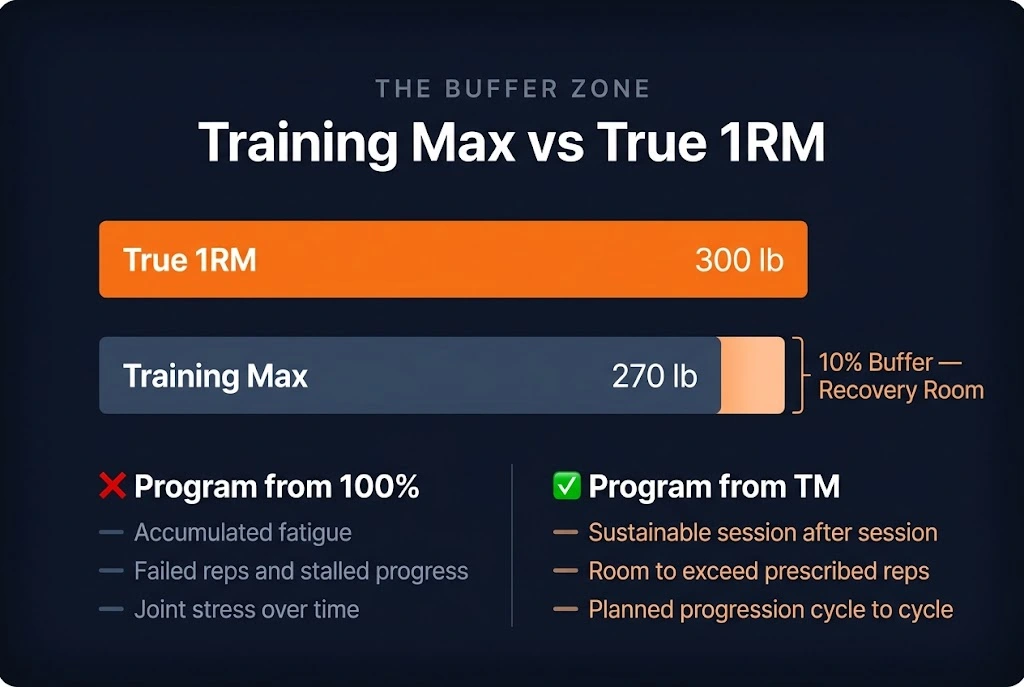
A true 1RM is the maximum weight you can lift once under optimal conditions, representing 100% of your current strength ceiling. A training max (TM) is a deliberately reduced percentage of that ceiling, typically 85–95%, that percentage-based programs use as the anchor for all their working sets. Every weight in the program is a percentage of the TM, not the 1RM. The practical consequence is visible in the numbers: a 5/3/1 Week 3 top set at 95% of a 270 lb TM is 256 lb, not 95% of the actual 300 lb 1RM (285 lb). The TM creates a safety buffer across the entire program.
The Logic Behind the Buffer
Why should anyone program below their maximum? Three reasons compound in importance:
- Sustainability. Repeatedly training near 100% of 1RM leads to accumulated fatigue, joint stress, and injury risk that interrupts training far more than it advances it. A conservative TM allows every scheduled session to be completed successfully and with technical quality. The NSCA training load guidelines consistently support sub-maximal anchors for long-term program integrity.
- Room for plus sets. In 5/3/1, the top set of each week is a plus set (5+, 3+, 1+): do as many reps as possible. A TM at 90% ensures the prescribed top-set weight is achievable for multiple reps, providing a genuine performance signal. A TM at 100% turns every top set into a near-maximal single.
- Planned progression. The TM increases by a fixed amount after each cycle (typically +5 lb for upper-body lifts, +10 lb for lower-body in standard 5/3/1). Starting below your true maximum gives the cycle room to run for several months before the weights outpace your capacity.
A Brief History: Jim Wendler and the Training Max Concept
The training max concept, as popularly applied in modern strength training, was codified by Jim Wendler’s 5/3/1 program, first published in 2009. Wendler’s key insight was that training at 90% of a tested 1RM produced more consistent long-term progress than programs anchored to true maximums. The simplicity of the 90% default, easy to calculate and easy to remember, combined with reliable results across thousands of lifters, made it the starting point for a generation of percentage-based programming.
How to Use the Training Max Calculator?
Step 1: Select Units and Rounding
Choose lb or kg. All labels and results switch immediately. Choose a rounding option: Standard (5 lb / 2.5 kg) for most gym environments, Fine for fractional plates, or Exact for spreadsheets. The rounding option applies to all calculated weights, both the TM and every dependent set weight.
Step 2: Enter Your 1RM
Direct 1RM Entry
Type your 1RM directly into the field. Use the most recent tested or reliably estimated value for the specific lift you’re programming. Maximum accepted value: 2,000 in any unit. If your program covers four lifts (squat, bench press, deadlift, overhead press), run the calculator separately for each; every lift has its own 1RM and its own training max.
Estimate from a Rep Set
If you don’t have a tested 1RM for the lift, enter a recent working set: weight and reps. The calculator applies the Epley formula (Estimated 1RM = weight × (1 + reps / 30)) to produce an estimated 1RM, which then drives the TM and all subsequent weights. Accuracy is highest at 1–5 reps. For sets above 8 reps, treat the resulting TM as an approximate starting point and expect to adjust after the first training block. See How Accurate Are 1RM Calculators? for the full accuracy context.
Step 3: Set Your Training Max Percentage
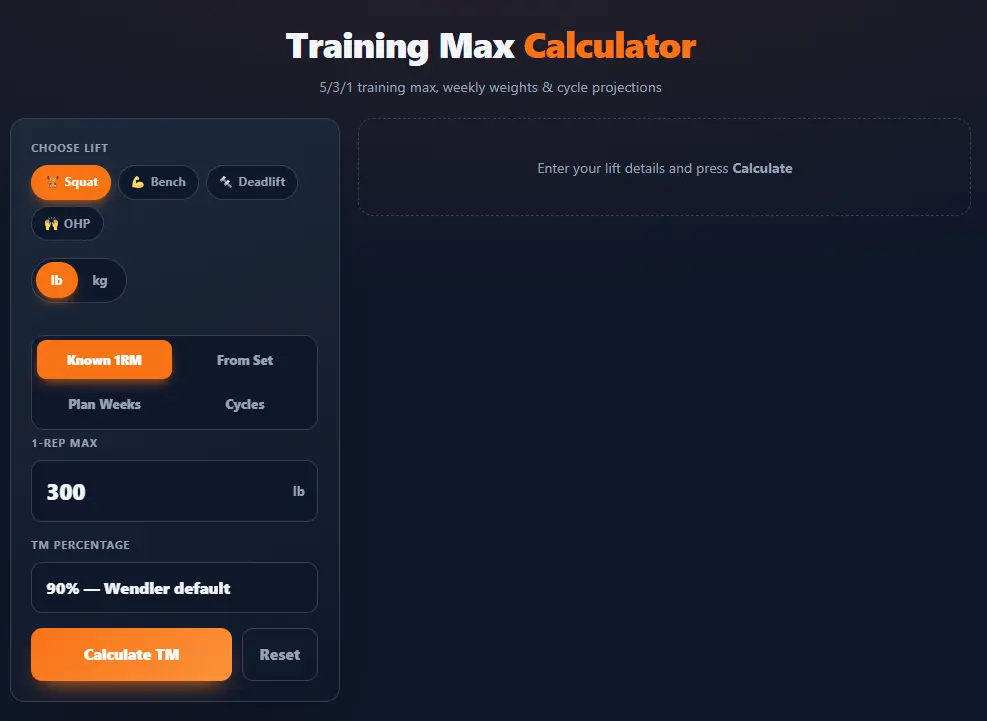
Select from the five preset TM% options (85%, 87.5%, 90%, 92.5%, 95%) or enter a custom value. The default is 90%, the most widely used starting point. The TM recalculates live as soon as you change the selector. If a specific program variation prescribes a different TM% (some Beyond 5/3/1 variations use 85%), use the custom field. The TM% choices and their specific use cases are covered in depth in the TM% section below.
Step 4: Choose Your Output Mode
After pressing Calculate (or after live recalculation updates), choose between Quickview and Detailed Table:
- Quick view: one card showing your TM and the top-set weight for each of the four 5/3/1 weeks. Use this for a quick check or to confirm your TM before building a full plan.
- 5/3/1 Preset: full four-week table with all three working sets per week and the deload, ready to take to the gym.
- Custom Table: user-defined percentage range and step, generating any progression scheme anchored to your TM rather than the preset 5/3/1 structure.
Understanding Your Training Max Percentage
The Five Standard Options
| TM% | Best for | Effect on top sets |
| 85% | True beginners; post-injury return; reset after stall | Conservative: The week 3 top set is ~80.75% of 1RM. Highly sustainable. |
| 87.5% | Beginners 3–6 months in; cautious intermediate | Moderate buffer; a safe starting point for most new 5/3/1 lifters |
| 90% | Standard 5/3/1 default; most intermediate lifters | Week 3 top set at ~85.25% of 1RM. The most tested recommended starting point. |
| 92.5% | Advanced lifters; short competition prep cycles | Less buffer; sustainable for experienced athletes who recover well from heavy work |
| 95% | Experienced athletes peaking for testing or competition | Minimal buffer: Week 3 top set approaches 90% of true 1RM. Use short-term only. |
The Default 90%: Why It’s the Starting Point
At 90%, Week 3’s top set (95% of TM) lands at 85.5% of your true 1RM: heavy enough to drive adaptation, light enough for multiple reps on the plus set, and recoverable week to week. Start at 90% unless you have a specific reason to deviate.
When to Adjust Your TM% Mid-Program
The TM% is not fixed for life. Three signals that it needs adjustment downward: Week 3 top sets are failing (missing prescribed reps); fatigue is not recovering between cycles; or you’re returning from illness, injury, or an extended training break. Adjust upward when plus sets are consistently yielding double the prescribed minimum reps, which indicates the TM has become too conservative. Use the RPE Calculator as a daily readiness check: if working sets consistently feel above their prescribed RPE, a TM adjustment is warranted before the next cycle.
What the Quick View Card Shows
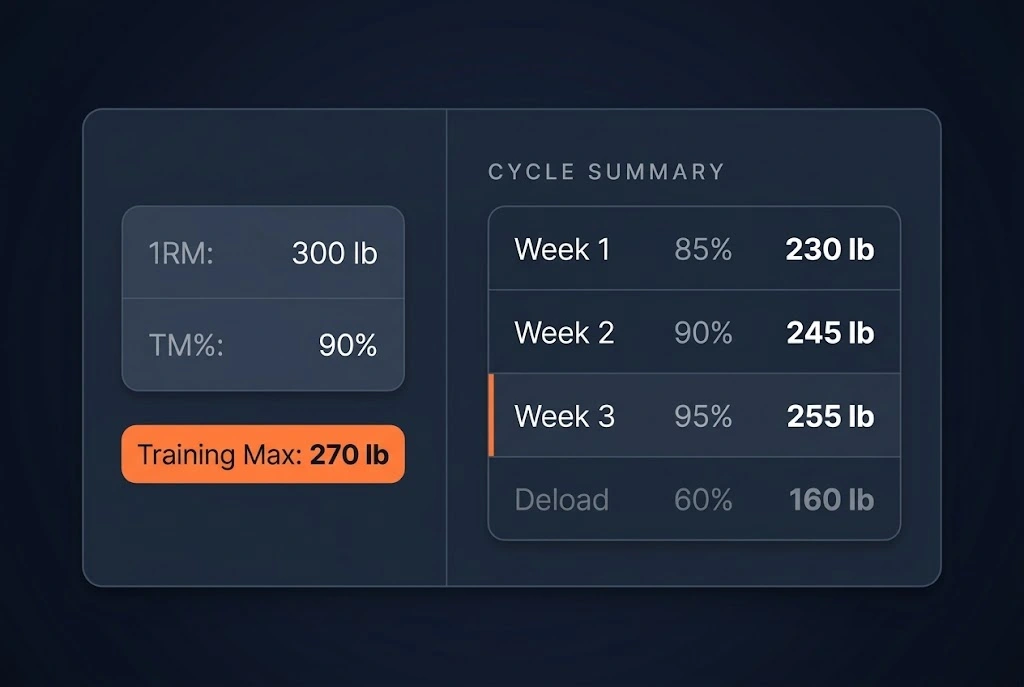
The Quick View card displays your Training Max in large text with the source breakdown (270 lb at 90% of 300 lb), then four rows for each program phase: Week 1 top set (85% of TM), Week 2 top set (90% of TM), Week 3 top set (95% of TM), and Deload (60% of TM), each with the percentage label and rounded weight. A one-screen snapshot without the full table.
Reading the Weekly Top Sets at a Glance
The four weights in Quick View represent the AMRAP top sets of each week, not the full program. Week 1 at 85% of TM is your lightest top set; Week 3 at 95% is your heaviest. The deload at 60% is the recovery week. Use the quick view to verify that the top-set weights feel appropriate before generating the full table. If Week 3’s weight looks too heavy or too light relative to your current strength, adjust the TM% or the 1RM input before proceeding to the Detailed Table.
Detailed Table Mode: Your Complete Program Reference
The 5/3/1 Preset: All Four Weeks
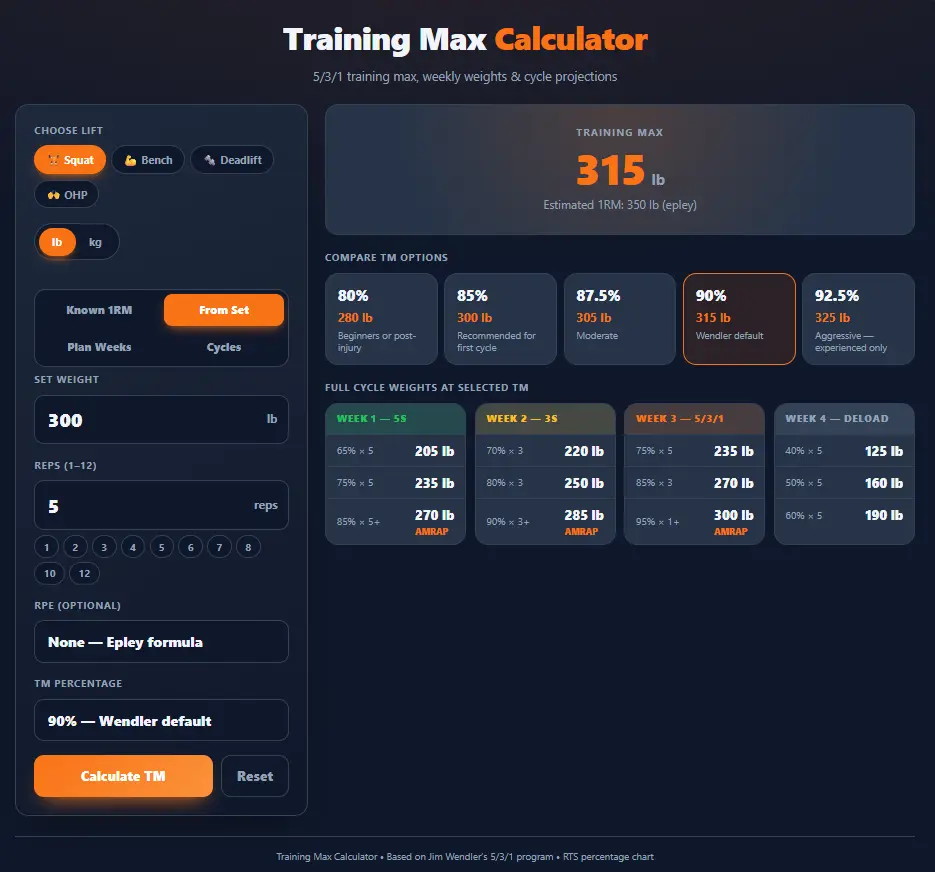
The 5/3/1 preset generates the full four-week table: three working sets per week plus a deload, all as percentages of the Training Max.
| Week | Set 1 | Set 2 | Top Set | Rep Scheme |
| Week 1 | 65% of TM | 75% of TM | 85% of TM | 5 / 5 / 5+ |
| Week 2 | 70% of TM | 80% of TM | 90% of TM | 3 / 3 / 3+ |
| Week 3 | 75% of TM | 85% of TM | 95% of TM | 5 / 3 / 1+ |
| Deload | 40% of TM | 50% of TM | 60% of TM | 5 / 5 / 5 |
“+” denotes an AMRAP set: do more than the prescribed minimum whenever possible. Deload sets are not AMRAP.
The program is built on progressive weekly intensity: each week gets heavier, with Week 3 representing the cycle’s peak. Deload follows to allow full recovery before the next cycle begins.
Week 1: Building Volume (65/75/85% of TM)
Week 1 is deliberately conservative; the goal is quality sets, not ceiling testing. The 5/5/5+ top set at 85% of TM should produce a high rep count (8–10+ for most intermediate lifters). A strong plus set in Week 1 is a positive indicator: it builds confidence and provides a data point for evaluating whether the TM is calibrated well.
Week 2: Increasing Intensity (70/80/90% of TM)
Week 2 ramps to 90% of TM for the top set at 3/3/3+. For a 270 lb TM, that top set is 243 lb rounded to 245 lb. The 3+ set should produce 4–6 reps for most intermediate lifters with a well-set TM. If you’re getting fewer than 3 reps on this set, the TM is too high.
Week 3: Peak Week (75/85/95% of TM)
The cycle’s highest-intensity week. The 5/3/1+ top set at 95% of TM should yield 2–4 reps for intermediate lifters: heavy enough to represent a meaningful stimulus, while still demonstrating the weight is below the true 1RM. Week 3 is where most strength adaptation accumulates, and the plus set is the key performance data point for evaluating cycle effectiveness.
Deload Week: Recovery and Reset
The deload (40/50/60% of TM, non-AMRAP) allows accumulated fatigue to dissipate before the next cycle. These sets should feel easy; that’s the point. After the deload, increase the TM by the prescribed increment (+5 lb for upper-body lifts, +10 lb for lower-body in standard 5/3/1) before calculating the next cycle’s weights.
Custom Table Mode: Any Percentage Program
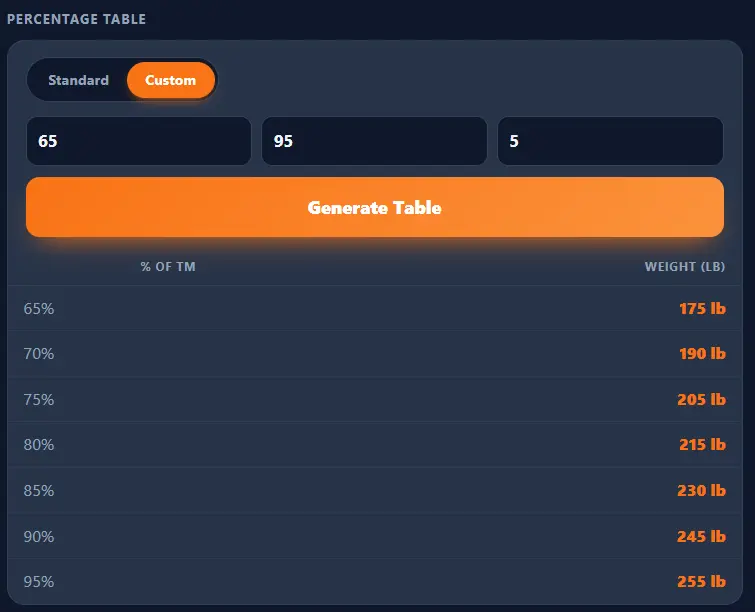
Switch to Custom in the Detailed Table section and enter a Start %, End %, and Step % to generate a bespoke percentage table anchored to your TM. Examples:
- 65–95% in steps of 5%: a 7-row general reference
- 80–95% in steps of 2.5%: a fine-grained strength block table
- 70–100% in steps of 10%: a quick zone overview
All values are still percentages of your Training Max, not the 1RM. Use this for any percentage-based program that isn’t 5/3/1. The % of 1RM Calculator provides a broader percentage reference if you want to compare TM-based weights against raw 1RM-based zones.
The 5/3/1 Connection: A Complete Worked Example
Worked Example: 300 lb Back Squat
A 300 lb squat 1RM at 90% TM gives a 270 lb training max. Below is the complete set-by-set breakdown for one full cycle at 5 lb rounding.
| Week | Set | % of TM | Exact Weight | Rounded Weight | Reps |
| Week 1 | Set 1 | 65% | 175.5 lb | 175 lb | 5 |
| Week 1 | Set 2 | 75% | 202.5 lb | 200 lb | 5 |
| Week 1 | Set 3 | 85% | 229.5 lb | 230 lb | 5+ |
| Week 2 | Set 1 | 70% | 189.0 lb | 190 lb | 3 |
| Week 2 | Set 2 | 80% | 216.0 lb | 215 lb | 3 |
| Week 2 | Set 3 | 90% | 243.0 lb | 245 lb | 3+ |
| Week 3 | Set 1 | 75% | 202.5 lb | 200 lb | 5 |
| Week 3 | Set 2 | 85% | 229.5 lb | 230 lb | 3 |
| Week 3 | Set 3 | 95% | 256.5 lb | 255 lb | 1+ |
| Deload | Set 1 | 40% | 108.0 lb | 110 lb | 5 |
| Deload | Set 2 | 50% | 135.0 lb | 135 lb | 5 |
| Deload | Set 3 | 60% | 162.0 lb | 160 lb | 5 |
Generate this exact table for your own 1RM from the calculator above. All values confirmed at 5 lb rounding.
Progressing to the Next Cycle
After completing the deload week, increase the TM by the program’s prescribed increment: +5 lb for upper-body lifts (bench press, overhead press) and +10 lb for lower-body lifts (squat, deadlift) in standard 5/3/1. Re-enter the updated TM or the updated 1RM into the calculator and generate the next cycle’s weights. Wendler recommends re-testing the actual 1RM after every few cycles to recalibrate if estimated and actual strength diverge. For the full cycle structure, see the Strength Training Programming.
Running All Four 5/3/1 Lifts
A Four-Lift Training Max Reference
5/3/1 programs four lifts: squat, bench press, deadlift, and overhead press. Each has its own 1RM and its own TM. Run the calculator once per lift. Using the same 90% TM for all four:
| Lift | 1RM | TM (90%) | Week 3 Top Set (95% of TM) |
| Back Squat | 300 lb | 270 lb | 255 lb |
| Bench Press | 225 lb | 202.5 → 200 lb | 190 lb |
| Deadlift | 365 lb | 328.5 → 330 lb | 315 lb |
| Overhead Press | 155 lb | 139.5 → 140 lb | 130 lb |
Run the calculator separately for each lift; the TM is lift-specific.
When to Update Individual Lift TMs
Each lift progresses at its own rate. Squat and deadlift typically add weight faster than bench and overhead press, so TMs diverge over time. Update a lift’s TM when any of these apply: the scheduled cycle increment has been earned by completing the cycle successfully; you’ve retested that specific lift’s 1RM; or a detraining event such as injury or an extended break has reduced the lift’s ceiling. Do not apply one lift’s progress to another.
Export, Print, and Take Your Plan to the Gym
Export to PDF
Clicking Export PDF generates a PDF (training-max-plan.pdf) in your browser; no server, no upload. The PDF adapts to the current output mode:
- Quickview PDF: TM summary card with weekly top sets
- 5/3/1 Preset PDF: Full four-week table with all 12 working sets and the deload
- Custom Table PDF: The user-defined percentage table
The 5/3/1 Preset PDF fits on one sheet and is designed for posting at a training station.
Clicking Print opens the browser’s print dialog with a clean, ink-friendly stylesheet that strips the calculator UI. Use “Save as PDF” in the browser as a secondary option if the Export button is not preferred. The Detailed Table print view is formatted to fit cleanly on one standard sheet for gym use.
Technical Notes and Limitations
Validation Rules
All computation runs client-side in JavaScript; no data is sent to any server. The engine is deterministic: identical inputs always produce identical outputs. For background on the 1RM input, see One Rep Max Basics.
| Input | Rule |
| 1RM | Finite positive number; maximum 2,000 (any unit) |
| Rep set weight | Finite positive number; less than 2,000 |
| Rep count | Integer 1–15 |
| TM% | 50–100 (preset options or custom) |
| Custom table Start% | 1–100; must be less than End% |
| Custom table End% | 1–100; must be greater than Start% |
| Custom table Step% | 0.5–25 |
All errors display inline; no alerts, no page reload.
Accuracy Limitations
- The 1RM must be accurate. If the underlying 1RM is inflated from a rep set overestimate, poor testing conditions, or outdated data, all downstream TM and set weights will be too high. Re-test periodically and update the 1RM before starting a new training block.
- Epley estimation for rep sets is approximate. 1RM estimates from multi-rep sets carry ±5% error at 1–5 reps and increase at higher rep counts. For rep sets above 8 reps, treat the resulting TM as a provisional starting point and expect adjustment after the first cycle.
- TM% is a starting point, not a final prescription. The 90% default works for most intermediate lifters, but individual recovery rates, training age, and program volume vary. Be prepared to adjust TM% after observing how the first cycle’s plus sets feel.